
What are filter questions?
Filter questions are questions that are hidden under certain conditions.
These conditions are defined by logical operators such as “equals”, “equals not”, “greater than” or “less than”. If the conditions apply to a person, this person will not be shown the question in the questionnaire.
Adding filter questions in the template editor
Under the “Topics & questions” block, the topics and questions for each template can be created and edited using the “Edit” icon.
Each created question can now become a filter question by adding a filter to it.
How to do this: When creating a question, the filter function appears below (here using a scale question as an example): “Hide this question if”. Click on “+ Add filter”.
There are three filter options available: “1. Department”, “2. Answer to”, and “3. Attribute”.

Department
The question is hidden if the stored department of the person completing the survey corresponds to the value as configured in the filter. Several departments can be specified in the filter by separating them with a comma.
Logic operators
There are two logic operators for the department filter:

| Logic Operator | Explanation |
| is one of | The question is hidden if the participant’s department is among the departments specified in the filter. Otherwise, the question will be displayed. |
| is not one of | The question is hidden if the participant’s department is not among the departments specified in the filter. Otherwise, the question will be displayed. |
Several filters can be combined with “or” or “and”.
When selecting “or”, at least one of the filters must apply for the question to be hidden.
If you select “and”, all filters must apply for the question to be hidden.
Different filters can also be combined.
Test filters
You can test the filter by placing yourself in one of the departments used in the filter. Do not forget to undo this change after the test.
If you do not have access rights to the user administration, ask someone from the departments to take part in a pre-test of the survey.
Answer to
The question is hidden if the answer to the question configured in the filter (“Search question”) corresponds to the value configured in the filter (“Answer”).
Logic operators
There are several logic operators for the answer filter. These compare the answer of a participant with the specified answer to a previous question.

| Logic Operator | Explanation |
| equals | The question is hidden if the participant’s answer and the filter are the same. You can only enter one answer option. |
| equals not | The question is hidden if the participant’s answer and the filter are not the same. You can only enter one answer option. |
| >= | The question is hidden if the value of the participant’s answer is greater than or equal to the value specified in the filter. You can only enter one answer option. |
| > | The question is hidden if the value of the participant’s answer is greater than the value specified in the filter. You can only enter one answer option. |
| <= | The question is hidden if the value of the participant’s answer is less than or equal to the value specified in the filter. You can only enter one answer option. |
| < | The question is hidden if the value of the participant’s answer is less than the value specified in the filter. You can only enter one answer option. |
| is one of | The question is hidden if the participant’s answer corresponds to one of the answers specified in the filter. Several possible answers can be separated by a comma. |
| is not one of | The question is hidden if the participant’s answer does not correspond to any of the answers specified in the filter. Several possible answers can be separated by a comma. |
| contains this text | The question is hidden if the participant’s answer contains the text specified in the filter. |
| does not contain this text | The question is hidden if the participant’s answer does not contain the text specified in the filter. |
Several filters can be combined with “or” or “and”.
When selecting “or”, at least one of the filters must apply for the question to be hidden.
If you select “and”, all filters must apply for the question to be hidden.
Different filters can also be combined.
Special case: Filter for scale questions and single/multiple choice questions
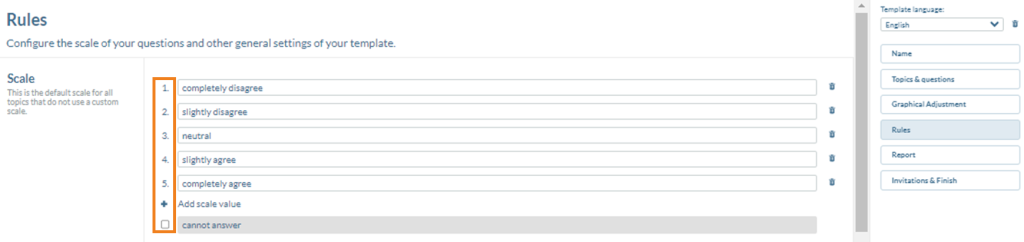
If, for example, a follow-up question is to be hidden for a person if they have clicked “Completely agree” in the trigger question, the value “5” must be entered in the answer field when configuring the filter.
The field “cannot answer” has the value 0, so if you want to filter out participants who click on this option, also enter the value 0 in the answer field.
Test filters
You can test the filter in the survey preview by clicking on the relevant answers.
Attribute
The question is hidden if the stored user attribute of the person completing the survey corresponds to the value as configured in the filter. (“Search user attribute”).
Logic operators
There are several logic operators for the attribute filter. These compare the value of a user attribute of a participating person with the attribute values specified in the filter.
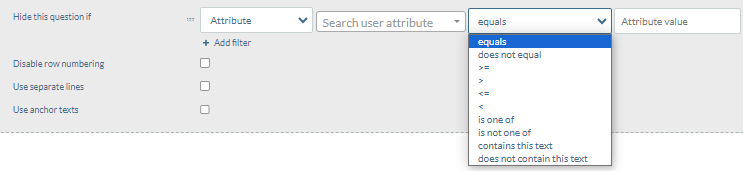
| Logic Operator | Explanation |
| equals | The question is hidden if the participant’s answer and the filter are the same. |
| equals not | The question is hidden if the participant’s answer and the filter are not the same. |
| >= | The question is hidden if the value of the participant’s answer is greater than or equal to the value specified in the filter. |
| > | The question is hidden if the value of the participant’s answer is greater than the value specified in the filter. |
| <= | The question is hidden if the value of the participant’s answer is less than or equal to the value specified in the filter. |
| < | The question is hidden if the value of the participant’s answer is less than the value specified in the filter. |
| is one of | The question is hidden if the participant’s answer corresponds to one of the answers specified in the filter. Several possible answers can be separated by a comma. |
| is not one of | The question is hidden if the participant’s answer does not correspond to any of the answers specified in the filter. Several possible answers can be separated by a comma. |
| contains this text | The question is hidden if the participant’s answer contains the text specified in the filter. |
| does not contain this text | The question is hidden if the participant’s answer does not contain the text specified in the filter. |
Several filters can be combined with “or” or “and”.
When selecting “or”, at least one of the filters must apply for the question to be hidden.
If you select “and”, all filters must apply for the question to be hidden.
Different filters can also be combined.
Test filters
You can test the filter by assigning yourself the corresponding value of the user attribute. You can find more information on this here. Do not forget to undo this change after the test. If you do not have access rights to the user administration, ask someone with the corresponding attribute value to take part in a pre-test of the survey.
Explanation using an example
We would like to create a questionnaire on the topic “Canteen Munich”, which is only displayed to participants who are employed at the Munich (“M”) location. For this we need the user attribute “Location”. (You can find help on managing user attributes here).
Let’s select the logic operator “is not one of” and select the location Munich (“M”). With this operation, the question is now hidden for all participants whose location is not “M”.
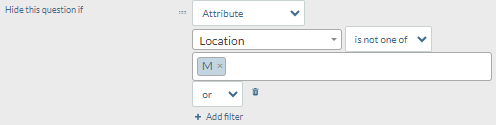
We would now like to ask the management about their satisfaction with the Munich canteen, even if the location is different from Munich (“M”), as the management travels to different locations.
To do this, we add the filter option “Department” using the “or” operator and specify as follows: This hides the question from all employees who are not either based in Munich or are not part of the management team.
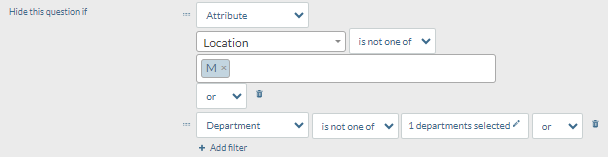
We would now like to find out whether our employees are satisfied with the vegan and vegetarian range in the Munich canteen. However, this question should only be shown to participants who actually follow a vegan or vegetarian diet and are based in Munich. So we want to hide this question from all other participants.#
In the topic “Munich canteen”, one scale question is: “I have a vegan or vegetarian diet”. We specify that further questions on the vegan and vegetarian range in the Munich canteen should only be asked if participants have answered at least “neutral” to this scale question. This answer option therefore corresponds to a value of 3 (neutral), 4 (slightly agree) or 5 (completely agree) in our preset scale:
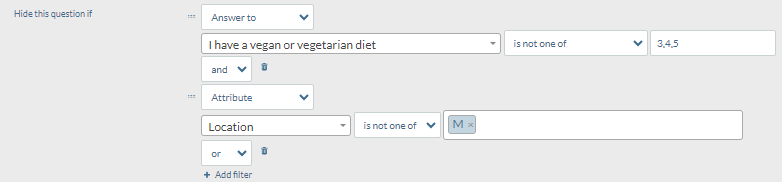
The question is therefore hidden from all participants who are not based in Munich and who are not at least partly vegan or vegetarian.
FAQ
Can I also “only display a question if…” ?
No. In this case, you must always “think in reverse”. In other words, you hide the question if a filter option (a department, an attribute, an answer) does NOT correspond to the target value for which the question is to be displayed.
For example, if you only want to display the question for employees at the Munich location, then activate “Hide this question if [attribute] location [is not one of] Munich.”
I would like to set an “Answer to” filter for a scale question. What do I enter in the answer field?
You enter the index of the answer here – not the text of the answer option (!). You will find the index of the answer under the “Rules” tab. Example 1c above explains exactly this case for you. (The field “cannot answer” has an index value of 0).
Hide if “Answer to”: I do not see my desired trigger question in the selection list. What could be the reason for this?
You probably want to use a sub-question within a scale question block as a trigger question. Try to use the trigger question as the first sub-question (!). The question should then be displayed as desired. The explanation to this is that a filter in the tool can only ever refer to one overall question (in this case the entire “scale question” block). Therefore, only the first sub-question can be used for filtering.
You can separate scale questions, i.e. create a separate scale question for the sub-question. If you now place the desired trigger question in the first position, you can set up the filter.
Could it be that some operators are equivalent?
Correct. We provide a wider and sometimes redundant selection of logic operators in the tool. Experience shows that people have individual preferences as to which one is most intuitive for them. For example, these four operators do the same thing (they all hide the question if the answer to a previous scale question was 1 or 2 and only show it if the answer to this question was 3,4 or 5: “is not one of 3,4,5”; “<3”; “<= 2”; “is one of 1,2”.
Which of these logic operators you use is up to you.